Created by Rainer Gerhards.
Updated by Rainer Gerhards.
Microsoft’s Active Directory relies heavily on DNS. DNS is used to find important resources like domain controllers. Because these in turn are needed to authenticate users. Windows will not work properly without a correctly configured DNS.
Unfortunately, Microsoft has decided to use very new standards in it’s DNS. The Windows environment relies on options like dynamic DNS and – to some degree – Unicode characters in DNS records. While most of this are open standards, they are only seldom used outside of the Microsoft environment. So in reality, only the Microsoft DNS server will ensure proper and hassle-free DNS operation. And if I say Microsoft DNS I mean the one that comes with Windows or newer operating systems – the Windows NT 4 DNS server won’t help much.
This article describes Microsoft’s approach, the issues with that and how to work around them.
Why needs Windows DNS?
Microsoft has decided to build Active Directory on top of open standards. DNS is *the* Internet standard for resource location. However, so far it was mostly used to resolve host names to IP addresses. Typically, it is used to get the IP address of the host so that a browser can technically connect to that machine.
However, DNS is more than an IP address resolver. DNS is a distributed database of so-called resource records. There are many resources besides IP addresses, most notable name servers or mail exchangers (a.k.a. mail servers). A relatively new record is the so-called service (SRV) record. That one is used to describe services residing on machine – for example a domain controller service. SRV records are an open standard. It is not only supported by Microsoft but also other vendors. However, other vendor’s support is limited and only available in current releases. The widespread used BIND (Berkley Internet Name Daemon) DNS server – the de-facto standard under Unix – must have at least version 8.1.2. If it is an older version, problems will arise almost instantly.
Active Directory uses SRV records to locate any and all services. Not only is the domain controller detected by SRV records, they also point to global catalog servers and other important services. Windows must be able to resolve references to these services. Otherwise it will fail. Correct DNS records are of uttermost importance for a healthy Active Directory.
What is DDNS?
So how do these (numerous) entries find their way to the DNS database. The typical answer so far was: a system administrator has manually entered them into it. If you have a look at the number of entries that Active Directory depends on – and their change rate – not a really practical answer. Especially if you take a look at all clients that of course need to be registered in DNS, too.
Clearly, a solution needs to be found to do it automatically. Fortunately, there is DDNS, the “dynamic” DNS. That standard enables systems to automatically enter their DNS records into the server’s database themselves. For example, a newly installed Windows server registers it’s IP addresses into DDNS as well as the SRV-records for any services running on it. Manual entries need not to be made.
Sound like a perfect solution? Well, what on this world is perfect… First of all, the number of DNS servers supporting DDNS is limited (especially the number of these ones working well…). Secondly, and that is even harder, DDNS has a number of security weaknesses. So you are typically limited in you options and will carefully evaluate if you would like to have DDNS running as your Internet (external) DNS server.
But beware – DDNS is really a life-safer in the Active Directory context and its problems can be worked around. Practically, we recommend using the Windows DDNS server instead of any third party product. Fortunately that server can neatly be integrated into existing DNS infrastructures. Just ensure that Windows Active Directory systems only use DDNS servers. Theoretically, you can also use a non-dynamic DNS server (that ones with the manual database entries). But we recommend this option only if you absolutely do not know how to fill all of that spare time…
So what does this mean in Reality?
Active Directory dependence on DDNS has some clear results: A Windows server without Active Directory can be used with any DNS server without any problems. For example, you can use your ISP’s DNS server (as often done). However, if on that very same machine Active Directory is installed, you should point it to one of the Active Directory domain’s DDNS servers. Except, again, you have lots of spare time…
Unfortunately in many cases the previous DNS settings is preserved. This most often happens during an upgrade from NT 4 DC to Windows. Because the previous DNS server does not support DDNS, the upgraded Windows domain controller can not register itself into it. If that is the case, the Active Directory DC logs an error message to the Windows event log. However, most users (and even most admins) do either not see that message or can not interpret it correctly (it is a bit cryptic if you don’t know the exact specifics).
Once this DNS problem has persisted, the real trouble begins. Active Directory is unable to function correctly due to missing DNS records and as such vital resources. Unfortunately, Windows falls back to pre-Active Directory methods for e. g. authentication, so the systems works to a certain degree. However, all pure Active Directory functions fail, the Windows event log rapidly fills with more and more additional error messages. If you try to install an additional AD DC in this situation, it will fail – once again with a very cryptic and hard to understand error message. In fact, the error says that the domain does not exist – but the wizard itself displays the domain to be present. Sounds like you would be puzzled? I bet you will!
Messages like that are a clear indication of an incorrectly configured DNS or missing entries. In most cases, a missing DDNS is the root cause of all this errors. In the authors personal experience, missing DDNS or otherwise misconfigured DNS is the number 1 trouble spot in Active Directory installations.
To avoid this, follow our #1 rule for Active Directory: Before installing your first Active Directory server, a working DDNS needs to be installed. It’s easy: add a Microsoft DNS server to the first Windows server that is being installed. It’s just a matter of minutes if you follow the wizard. Most wizards will also automatically install the DNS server if you don’t oppose it. Once the DNS server is set up, the DNS zone for Active Directory needs to be created. Easily done with DNS manager (under “Forward-Looking Zones).
But having the DNS server and DNS zone in place is not sufficient: It needs to be used by your systems! Once again, here very often a mistake occurs. Most people tend to use their provider’s DNS server, because that is what they did all the time. But this is not an option for Active Directory! So you want to make sure you use your own (D)DNS server. Manually, this is done via the network card’s properties:
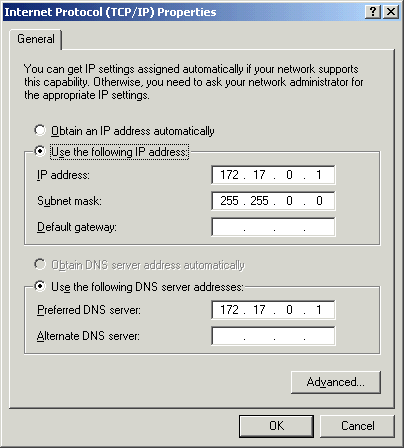
The screenshot shows a typical Active Directory server setup: that server is working as a DDNS server as well and its preferred DNS server points to itself. So it will be able to register its DNS records and query them successfully. By the way: all dialogs say “DNS” – read it as “DDNS” and you will have less trouble.
In many scenarios, people even have tried this setup but than lost Internet name resolution – and then switched back to their provider’s DNS server. Don’t let fool you: the setup here is correct.
Important: if you install other Windows servers and workstations (Windows Professional), make sure that these systems do use your own DDNS server as well. Otherwise, they won’t see the vital Active Directory information and as such will not work properly.
Also, ensure that you apply “old style” best DNS practices. Specifically, have at least two DNS servers available. If you operate a single server and that server fails (or is just rebooted), no DNS resolution is available at all. During such periods, network operation is seriously affected. If you have at least two servers, that won’t happen to you. In case the first one fails, the client automatically switches to the second one. So the screenshot above is not really an ideal configuration – the alternate DNS server is missing.
Smooth Active Directory Installation
Once the DNS system has correctly been installed, Active Directory installation can be carried out. Typically, this is now a painless process. If you still experience any unexpected error messages, the server may not already have registered all of its records into the DDNS. In this case, open up a commend prompt and type “ipconfig /registerdns”. Then wait another 15 minutes before continuing. It is also a good idea to check the event log if there are any errors.
Please note that for all actions described here no reboot is necessary. Microsoft has really reached its goal to reduce the number of reboots in this area.
By the way: most of the things described in this article are done automatically when you run the Active Directory wizards with default settings. However, many people see a need to modify these settings. The most common trouble cause is Internet name resolution, which might not work correctly when the wizards are run with the defaults. Please see our related article if you experience any problems in that area.
Even if you run the wizards and accept default settings – checking to ensure the wizard configured the system correctly does not harm. Instead it can be your life-saver…
Active Directory must be carefully designed!
I would like to drop one important reminder. I have written this article after seeing numerous questions on active directory DNS issues. Active directory is a great tool with enhanced capabilities – but it is also very complex. If someone just wants to try it on a home PC – or a lab machine – try and error may work (but will also cause lots of frustration).
If active directory is to be setup in an corporate environment – no matter how small or how large – try and error is definitely not an option! Active directory requires careful design. For a small biz its an easy task to do so – as long as you exactly know what you are talking about. So if in doubt, I recommend going out and asking someone who knows how to do it.